
Ready to transform your business with Workflow Automation?
Contact our expert team today for a tailored strategy and free consultation.
Get a Free ConsultationNo services available in this category yet.
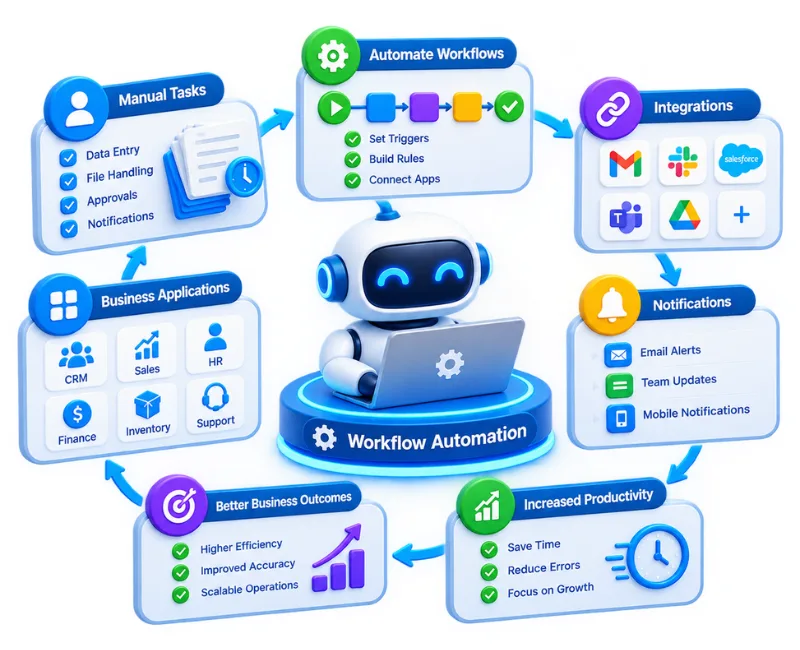
Manual tasks, repeated data entry, disconnected applications, and approval delays can quietly consume valuable working hours. Workflow automation replaces unnecessary manual steps with structured, connected processes that move work forward with less intervention.
Falconics IT Solutions helps businesses design and implement workflow automation around their actual operations. We connect applications, systems, teams, and business rules so routine work can be handled more consistently while your people focus on decisions that require human judgment.
Workflow automation uses software and integrations to execute defined business tasks automatically based on triggers, rules, conditions, or approvals.
Instead of an employee manually moving information from one system to another, sending routine notifications, updating records, or following up on predictable tasks, an automated workflow can perform those steps in the correct sequence.
The objective is not to automate everything. It is to identify where automation creates genuine operational value while keeping important human decisions, exceptions, and controls in the process.
Falconics approaches automation around the complete workflow rather than treating individual tasks in isolation. This helps ensure that automation improves the underlying process instead of simply making an inefficient process run faster.
Process Analysis and Workflow Mapping
We examine how work currently moves between people, departments, applications, and approval stages. This helps identify repetitive activities, bottlenecks, unnecessary handoffs, and practical opportunities for automation.
Workflow Design and Automation
Business rules, triggers, conditions, approvals, notifications, and actions are structured into automated workflows based on your operational requirements.
Application and System Integration
Where appropriate, workflows can connect different business applications so information can move between systems without unnecessary manual intervention.
Data Movement and Synchronization
Automated processes can help transfer, update, or synchronize information between connected systems, reducing duplicate data entry and helping maintain consistent records.
AI-Powered Workflow Automation
For suitable use cases, AI can be incorporated into workflows involving tasks such as document processing, information extraction, classification, customer interactions, and decision support.
Monitoring and Optimization
Automation should remain useful as your business changes. Workflows can be reviewed and refined as processes, systems, transaction volumes, and business requirements evolve.
The right automation opportunities depend on how your organization operates. Common use cases include:
For example, when a new enquiry arrives, an automated workflow can capture the information, create or update the relevant CRM record, assign the enquiry to the appropriate team member, and trigger a follow-up notification.
The strongest automation projects improve the way work moves through an organization, not simply the number of tasks performed automatically.
Less Repetitive Work
Teams spend less time on predictable administrative activities and more time on work that requires communication, analysis, creativity, or judgment.
Fewer Avoidable Errors
Automated rules can reduce mistakes associated with repetitive data entry, missed handoffs, and inconsistent execution.
Faster Process Completion
When routine actions happen automatically, work does not have to wait for every manual step to be completed before moving forward.
Better Process Visibility
Structured workflows make it easier to understand where work is, what happens next, and where delays or exceptions occur.
More Consistent Operations
Standardized workflows help teams follow the same process across recurring activities instead of relying entirely on individual working methods.
Easier Scaling
As transaction volumes increase, automation can handle suitable repetitive workloads without requiring every additional task to be performed manually.
A useful automation project starts with the business process, not the technology.
01 — Understand the Process
We begin by understanding the current workflow, stakeholders, applications, dependencies, repetitive tasks, and operational challenges.
02 — Identify Automation Opportunities
Potential automation points are assessed according to frequency, complexity, business impact, dependencies, and the level of human judgment involved.
03 — Design the Workflow
Triggers, actions, conditions, approvals, integrations, exception handling, and data requirements are mapped into a practical workflow.
04 — Build and Integrate
The automation is implemented and connected with the relevant applications or systems according to the agreed requirements.
05 — Test and Refine
Workflows are tested against normal scenarios and relevant exceptions before being introduced into regular operations.
06 — Monitor and Improve
After implementation, workflows can be reviewed and refined as business requirements, processes, and technology environments change.
Workflow automation can support businesses at different stages of operational maturity.
Startups and Growing Businesses
Automation can reduce the amount of manual administration required as processes become more complex and transaction volumes increase.
Small and Medium Businesses
Automation can help standardize recurring operations without requiring teams to manage every process through spreadsheets, emails, and manual follow-ups.
Established Organizations
Automation can connect departments and applications where fragmented processes create unnecessary delays or duplicated work.
Technology and Digital Businesses
Automation can become part of larger systems involving APIs, CRM platforms, cloud applications, AI tools, and custom software.
Automation is particularly useful when a business encounters recurring operational friction such as:
The solution is not always automation. Sometimes the better answer is to simplify the process first. Our approach considers both before recommending what should be automated.
Depending on the scope of the engagement, workflow automation projects may include:
The final scope is determined by your existing systems, process complexity, automation objectives, and integration requirements.
Falconics IT Solutions approaches workflow automation from both a technology and business-process perspective.
The focus is on understanding how your organization currently works before deciding what should be automated. This helps avoid automating unnecessary steps or introducing technology that does not solve the underlying operational problem.
Where required, workflow automation can work alongside custom software, CRM platforms, ERP systems, APIs, cloud applications, AI tools, and other business technologies.
Clear workflow logic, appropriate exception handling, testing, documentation, and maintainability are also important considerations when an automated process becomes part of everyday business operations.
Workflow automation pricing depends on the scope and technical requirements of the project rather than a fixed package.
Factors that can influence the investment include:
A straightforward internal workflow may require considerably less work than a multi-system process involving complex business rules and several integration points. A proper assessment is therefore more useful than quoting a generic price without understanding the process.
The timeline depends on the number of workflows, integration requirements, complexity of business rules, availability of existing APIs, testing requirements, and stakeholder involvement.
Before development begins, the workflow should be clearly defined. Clients can help keep projects moving by providing relevant process documentation, system information, business rules, and access to people responsible for the existing workflow.
Automation can improve operational efficiency, but results depend on the quality of the underlying process and implementation. A poorly designed process should generally be simplified before it is automated.
Workflow automation uses technology to execute recurring business tasks according to predefined triggers, rules, conditions, and actions. It can reduce manual intervention and connect different stages of a business process.
Processes involving repetitive, rule-based work are often suitable for automation. Examples include lead assignment, approvals, notifications, CRM updates, employee onboarding, document processing, reporting, and data synchronization.
Yes. Where appropriate integrations or APIs are available, workflows can connect applications and transfer information between them. The feasibility depends on the systems involved and their technical capabilities.
Yes. Small and growing businesses can benefit when repetitive administrative work begins consuming significant employee time. A clearly defined, frequently repeated process is often a good starting point.
Yes. AI can be incorporated when it provides a practical advantage. Depending on the use case, AI may support classification, information extraction, document processing, customer interactions, or other tasks that go beyond straightforward rule-based automation.
The purpose of effective automation is generally to reduce repetitive work rather than eliminate the need for people. Employees can remain responsible for decisions, exceptions, relationship management, and tasks that require judgment.
There is no single timeline for every project. The duration depends on workflow complexity, number of systems, integration requirements, testing, custom development, and the overall project scope.
Yes. Process simplification should often come before automation. Automating unnecessary steps can make an inefficient process faster without actually making it better.
Ongoing technical support and maintenance can be provided according to project requirements. This may include workflow updates, troubleshooting, integration changes, monitoring, and further optimization.
Start by identifying a recurring process that consumes substantial manual effort or frequently creates delays. Falconics can review the workflow, understand the existing systems, and determine whether automation is a practical fit.
If repetitive processes are taking time away from higher-value work, it may be time to examine what can be simplified, connected, or automated.
Falconics IT Solutions can help assess your current workflow and identify practical opportunities for automation based on your business processes and technology environment.
Contact our expert team today for a tailored strategy and free consultation.
Get a Free Consultation