
Ready to transform your business with Business Process Automation?
Contact our expert team today for a tailored strategy and free consultation.
Get a Free ConsultationNo services available in this category yet.
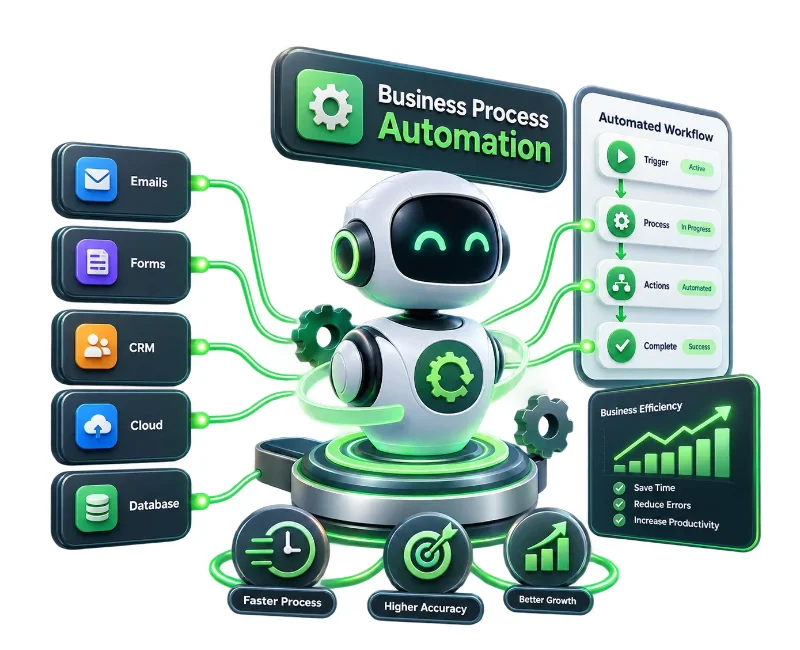
Business Process Automation helps businesses turn repetitive, manual activities into structured digital workflows. FalconicsIT helps identify suitable automation opportunities, connect business systems, and build practical workflows around the way your organization actually operates.
From approvals and data handling to notifications, document processing, reporting, and system-to-system workflows, automation can reduce unnecessary manual intervention while giving teams more time for work that requires judgment and expertise.
Automate repetitive and rule-based activities
Connect workflows with existing business applications
Reduce avoidable manual errors and process delays
Improve visibility across recurring business operations
Business Process Automation is the use of software, integrations, workflow engines, and automation technologies to execute defined business activities with less manual intervention.
Instead of relying on employees to repeatedly transfer information, send reminders, check statuses, prepare routine reports, or move tasks between systems, an automated workflow can perform these actions according to predefined rules.
The objective is not to automate everything. The more useful approach is to identify processes where automation can remove unnecessary effort without making the operation harder to manage.
Automation is particularly useful when a process happens frequently, follows predictable rules, involves multiple people or systems, or creates avoidable delays.
For example, a business may automate the movement of a customer enquiry from one system to another, route an approval to the appropriate person, trigger notifications when an action is overdue, or extract information from documents and pass it into an internal workflow.
Common automation opportunities include:
Lead and customer data workflows
Approval and request processes
Invoice and document handling
Employee onboarding workflows
Order and service request processing
Notifications, alerts, and recurring reports
FalconicsIT can help businesses approach automation from process analysis through implementation and integration. The exact scope can be shaped around the systems, workflows, and operational requirements involved.
Manual handoffs between departments can create delays and make it difficult to know where a task currently stands.
Workflow automation establishes defined steps, responsibilities, conditions, and actions so that work moves through the appropriate stages automatically. This can be applied to approvals, service requests, internal operations, customer workflows, and other recurring processes.
Automation becomes more useful when information can move between the systems a business already uses.
Integration can connect applications such as CRM, ERP, databases, customer portals, productivity tools, or other business software. Instead of repeatedly entering the same information into multiple systems, relevant data can move between connected processes according to defined rules.
For repetitive, rule-based activities that still depend on existing applications, Robotic Process Automation can provide another route to automation.
RPA can be considered for tasks such as structured data entry, information transfer, repetitive application interactions, and routine processing where the underlying workflow is predictable.
Businesses often spend significant time collecting, checking, transferring, and organizing information from documents.
Automation can help structure these processes by moving information into the appropriate systems, triggering subsequent actions, and reducing unnecessary manual handling. The right approach depends on document formats, data quality, business rules, and the systems involved.
Routine reporting and status communication can consume valuable employee time.
Automated workflows can collect defined information, generate recurring reports or updates, and notify relevant users when specific conditions are met. This helps teams spend less time maintaining routine communication and more time acting on the information.
The value of automation depends on the process being improved, but well-designed workflows can produce several practical operational benefits.
Less repetitive work
Employees can spend less time on predictable administrative tasks and more time on activities requiring customer interaction, analysis, problem-solving, or decision-making.
Fewer avoidable errors
Automated workflows apply predefined rules consistently, reducing mistakes associated with repeated manual data entry and handoffs.
Faster process execution
Tasks can be triggered immediately when their conditions are met rather than waiting for someone to manually initiate the next step.
Better process visibility
Defined workflows make it easier to understand where tasks are, what actions have been completed, and where exceptions require attention.
More consistent operations
Standardized workflows help ensure recurring processes follow the intended sequence rather than depending entirely on individual working methods.
Greater scalability
When transaction volumes increase, automated processes can handle recurring work without requiring every additional task to be performed manually.
Effective automation starts with understanding the process, not simply selecting a technology.
1. Process Discovery
We examine the existing workflow, identify repetitive activities, understand dependencies, and determine where manual intervention is creating unnecessary effort or delays.
2. Automation Planning
The suitable automation opportunities are defined based on business requirements, process complexity, existing systems, and the desired operational outcome.
3. Workflow and Solution Design
The process is translated into defined workflow logic, including triggers, approvals, data movement, exceptions, user responsibilities, and system interactions.
4. Development and Integration
Automation components are implemented and connected with the relevant business applications or data sources.
5. Testing and Refinement
The workflow is tested against expected scenarios and exceptions before deployment. Where necessary, the process is refined to improve reliability and usability.
6. Deployment and Ongoing Improvement
Once implemented, the automation can be monitored and adjusted as business requirements, systems, or workflows change.
Depending on the scope of the engagement, deliverables may include:
Process and workflow assessment
Automation opportunity identification
Workflow design and documentation
Custom automation development
Application and system integration
RPA implementation where appropriate
Automated notifications and approvals
Testing and deployment
Process documentation and handover
Ongoing maintenance or enhancement support
The final deliverables depend on the processes selected for automation and the technology environment in which they need to operate.
Automation can be relevant when your teams regularly encounter issues such as repeated data entry, disconnected applications, manual approval chains, recurring reporting work, or tasks that depend on individuals remembering the next action.
The solution is not always to automate the existing process exactly as it is. In some situations, the workflow should first be simplified or reorganized so that automation supports a cleaner operating model.
This distinction matters because automating an inefficient process can simply make an inefficient process run faster.
Business Process Automation can be useful for organizations of different sizes and operating models, provided there are recurring processes where automation can create practical value.
Growing businesses can use automation to establish repeatable workflows without continuously increasing administrative effort as operations expand.
SMEs can automate time-consuming internal processes while retaining their existing business applications and operating structures where practical.
E-commerce and D2C businesses can explore automation across orders, customer communication, inventory-related workflows, fulfilment processes, and internal operations.
B2B organizations can automate lead routing, approvals, documentation, reporting, customer onboarding, and other multi-step workflows.
Larger organizations can use process automation to connect departments and systems while standardizing recurring operational activities.
The most suitable use cases depend on the organization's processes rather than its industry alone.
Potential applications include finance and accounting workflows, sales operations, customer service, HR processes, procurement, administration, logistics, document management, and internal reporting.
For example, an approval process that currently requires email exchanges, manual status checks, and repeated data entry can potentially be converted into a structured workflow with defined approvals, notifications, and records.
Automation should solve a business problem rather than introduce technology for its own sake.
FalconicsIT approaches process automation around the existing operational requirements of the business. This means considering the workflow, users, systems, data, exceptions, and integration requirements before deciding how automation should be implemented.
The focus is on building solutions that are practical to use, understandable to the people responsible for the process, and capable of adapting as business requirements change.
There is no single timeline that applies to every automation project.
The scope can vary depending on the number of processes involved, workflow complexity, existing software, integration requirements, data quality, approval structures, automation technology, testing requirements, and the number of exceptions the solution needs to handle.
A focused workflow may require a relatively contained implementation, while automation spanning several departments and business applications requires considerably more planning and integration work.
Pricing depends on the scope and technical requirements of the automation project rather than a fixed standard package.
Important factors can include the number and complexity of workflows, existing systems, third-party integrations, RPA requirements, custom development, data processing needs, testing, deployment, and ongoing support.
FalconicsIT can assess your requirements and define the appropriate scope before determining the engagement cost.
Business Process Automation uses software and digital workflows to automate defined business activities that would otherwise require repeated manual effort. It can involve workflows, integrations, RPA, notifications, document processing, and other automation technologies.
Processes involving repetitive, rule-based, and predictable activities are often suitable candidates. Examples include approvals, data transfer, document processing, reporting, notifications, onboarding, lead routing, and recurring administrative workflows.
Yes, depending on the systems involved and the available integration options. Existing applications can often remain part of the workflow rather than being completely replaced.
Not exactly. RPA is one technology used for process automation, particularly for repetitive, rule-based interactions with applications. Business Process Automation is broader and can include workflow automation, system integration, document processing, APIs, and other technologies.
Not necessarily. In many cases, the objective is to connect and automate existing systems where they are suitable for the business. Whether replacement or modernization is appropriate depends on the current technology environment.
The process is evaluated based on factors such as repetition, volume, rules, manual effort, error risk, dependencies, business impact, and technical feasibility. Not every manual process is a good candidate for automation.
The timeline depends on the scope and complexity of the project. A single workflow can differ substantially from an automation program involving multiple departments, applications, and integrations.
Automation is generally used to handle defined repetitive activities rather than remove the need for human judgment altogether. Human involvement can remain where decisions, exceptions, approvals, relationships, or specialized expertise are required.
Yes. Workflows can be designed around specific business rules, approval structures, applications, users, and operational requirements rather than relying on a one-size-fits-all process.
A useful starting point is an overview of the process you want to improve, the systems currently involved, the people responsible for the workflow, and the main operational issues you want to address.
Start by identifying one process that consumes significant manual effort or regularly causes delays. FalconicsIT can then help assess the workflow, determine whether automation is appropriate, and define the next implementation steps.
The right automation project starts with a clear understanding of the process you want to improve. Share your current workflow, systems, and operational challenges with FalconicsIT, and we can discuss where automation may fit.
Contact our expert team today for a tailored strategy and free consultation.
Get a Free Consultation